You create a UGC campaign on Shortcut from the “New campaign” button in the sidebar, in six steps: basics, goal, brief, scope, creators and review. The campaign is saved as a draft while you work on it, and you can come back to it at any time.
Nothing is charged and no invitation is sent until you press “Book and pay” in the last step. Until then you can change anything.
Before you start
- Add at least one brand. ShortcutAI reads your brand profile to write the brief, so the fuller the profile, the sharper the brief. See How do I add my brand and products?
- You need the “Owner” or “Admin” role. Members cannot create campaigns.
- If you have no idea yet, ask the ShortcutAI assistant: “Suggest ideas for a new campaign”. See the ShortcutAI assistant.
Choose how to build it
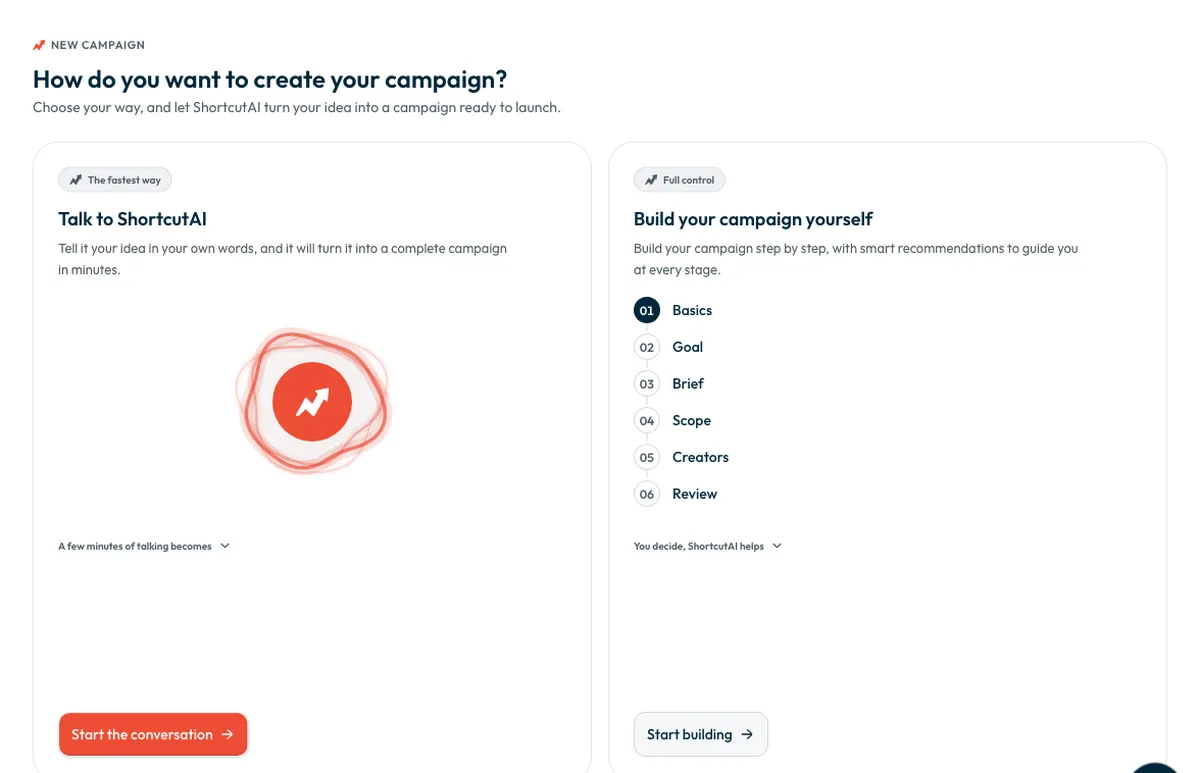
The “How do you want to create your campaign?” screen offers two ways. Either way, you review everything and see the price before paying.
- Press “New campaign”.
Choose one of the two ways:
- To build it yourself, press “Start building”. To talk it through, press “Start the conversation”.
| Way | What happens |
|---|---|
| “Talk to ShortcutAI” | You describe your idea out loud in a conversation with ShortcutAI, the platform's AI assistant. From what you say it writes your objective and audience, creator requirements, deliverables and dates, and the brief itself. You then review and edit what it wrote in the form. Your browser needs permission to use the microphone. If you would rather type, press “Continue with the form”. |
| “Build your campaign yourself” | You fill in each step yourself, and ShortcutAI helps beside each one: it writes the brief, improves its wording and recommends creators. |
Step 1: Basics
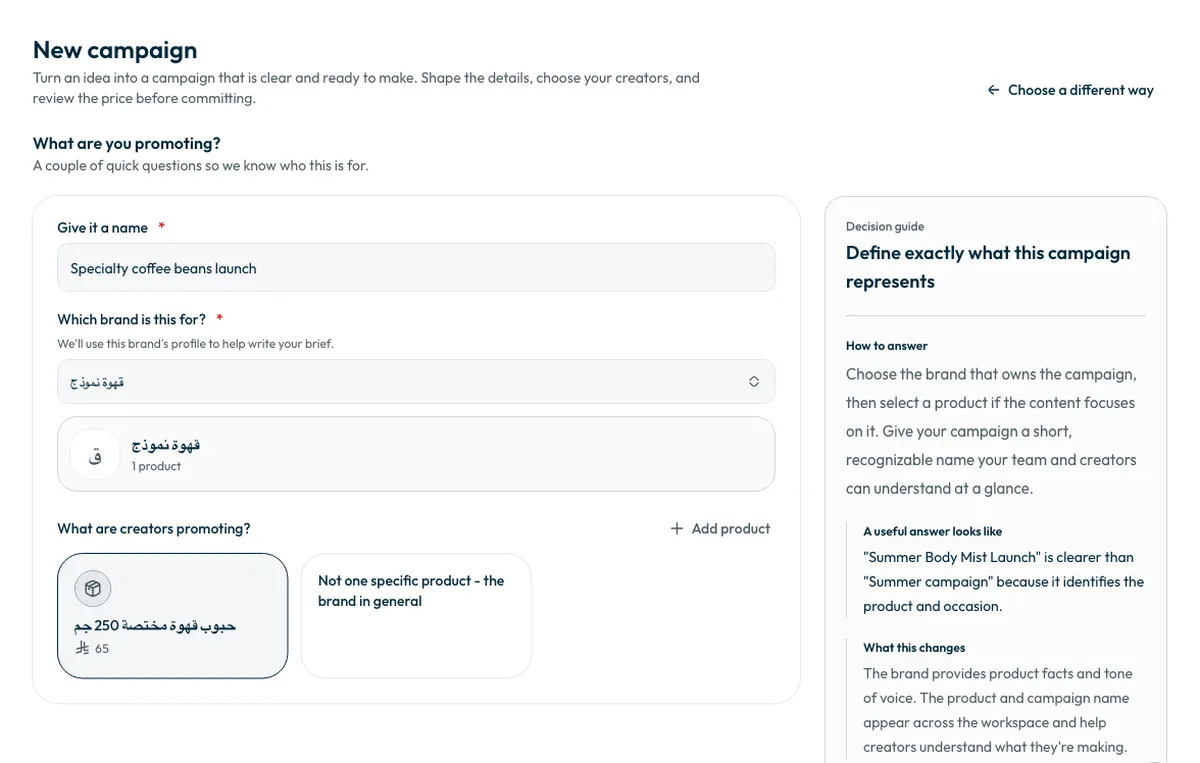
Here you set the brand and the product. ShortcutAI uses the chosen brand's profile to help write your brief, and the campaign and product names appear in the invitations creators receive.
- Give the campaign a short name under “Give it a name”. A name that says the product and the occasion is clearer, such as “Summer Body Mist Launch” rather than “Summer campaign”.
- Choose the brand.
Choose the product creators will promote, or “Not one specific product - the brand in general”.
- Press “Start the campaign”.
The next steps, and what each one changes
- Goal: you choose the campaign goal, how creators work with you and what you receive. These choices shape which creators are suggested and the cost. See Product seeding, store visit or digital experience: which should I choose?
- Brief: you write what creators film, or ShortcutAI writes it from your brand profile, product page and goal. See How do I write a campaign brief for creators?
- Scope: you set the number of creators, their account sizes and the campaign dates. See How do I set the number of creators and the campaign dates?
- Creators: you pick them yourself, or ask for recommendations in which ShortcutAI reads your brief. See How do I choose the right creators for my campaign?
- Review: you read the campaign the way a creator will, then book and pay. See How do I book creators and pay?
Move between steps with “Save and continue”. Each step is saved when you press “Save and continue”, and you can return to the draft later from “Campaigns”.
Common questions
Is anything charged while I create the campaign?
No. Nothing is charged and no invitation is sent before you press “Book and pay”.
Can I stop and come back later?
Yes. Each step is saved when you press “Save and continue”, and you will find the draft under “Campaigns”. The number of drafts open at the same time is limited. If you reach the limit, the platform lists your drafts so you can finish one or delete one you no longer need.
What does the conversation with ShortcutAI produce?
ShortcutAI writes what you said into the form's fields. You review and edit them, then finish the steps and choose creators as you would when building it yourself.
To understand UGC and how the platform works from the start, read What is UGC, and how does Shortcut work?
Did this article answer your question?
Thank you. We use your answer to improve the article.
Your answer could not be saved. Try again.
Need more help?
Contact our support team, and we will help you with your question.