The brief is what every creator reads before filming. Cover the audience, the key message, the facts that must be stated exactly, and the action you want viewers to take.
Keep it short and clear, because creators read it on their phones. You can also ask ShortcutAI, the platform's AI assistant, to write a full draft from your brand profile, your product page and the campaign goal, then edit it.
Why does the brief matter?
- It is the filming reference: the clearer the brief, the fewer revisions, the more accurate the facts, and the more natural each creator's style stays.
- It decides who is recommended: ShortcutAI reads the brief and the “Please do” and “Please don't” lists when it recommends creators, and compares the brief's subjects with what they post.
- It becomes your review checklist: the “Please do” and “Please don't” items appear beside the video when you review it, so you approve or ask for changes on clear grounds.
Ask ShortcutAI to write the brief
- In the “Brief” step, while the field is empty, press “Have ShortcutAI write it”.
- Say what the campaign is about in one line, then press “Have ShortcutAI write it”.
- ShortcutAI reads your brand profile, opens your product page and works out the key messages, then writes the brief and the do's and don'ts. This usually takes under a minute, and a complex product can take two.
- ShortcutAI also suggests a campaign name under “ShortcutAI also suggested”. Press “Use it” if you like it.
- Read the whole draft and edit it. The platform reminds you: “ShortcutAI wrote part of this - read it through before you send.”
If your brand has no marketing profile, you see “Add your brand profile and ShortcutAI can write a sharper brief.” The profile is built from your brand's website. See How do I add my brand and products?
Write the brief yourself, or improve its wording
Type it in “The brief”. For example: “Film yourself making a morning cup with the product. Mention that the beans suit pour-over and espresso. End by inviting viewers to order from the online store.”
- To improve a sentence, select it and use the toolbar: “Make it clearer”, “Shorten” or “Add detail”. To translate it, choose “Translate to English” or “Translate to Arabic”.
- Watch the checks under the field: “Enough detail”, “Audience mentioned”, “Style mentioned” and “What the video shows”. Each one turns green when the brief covers it.
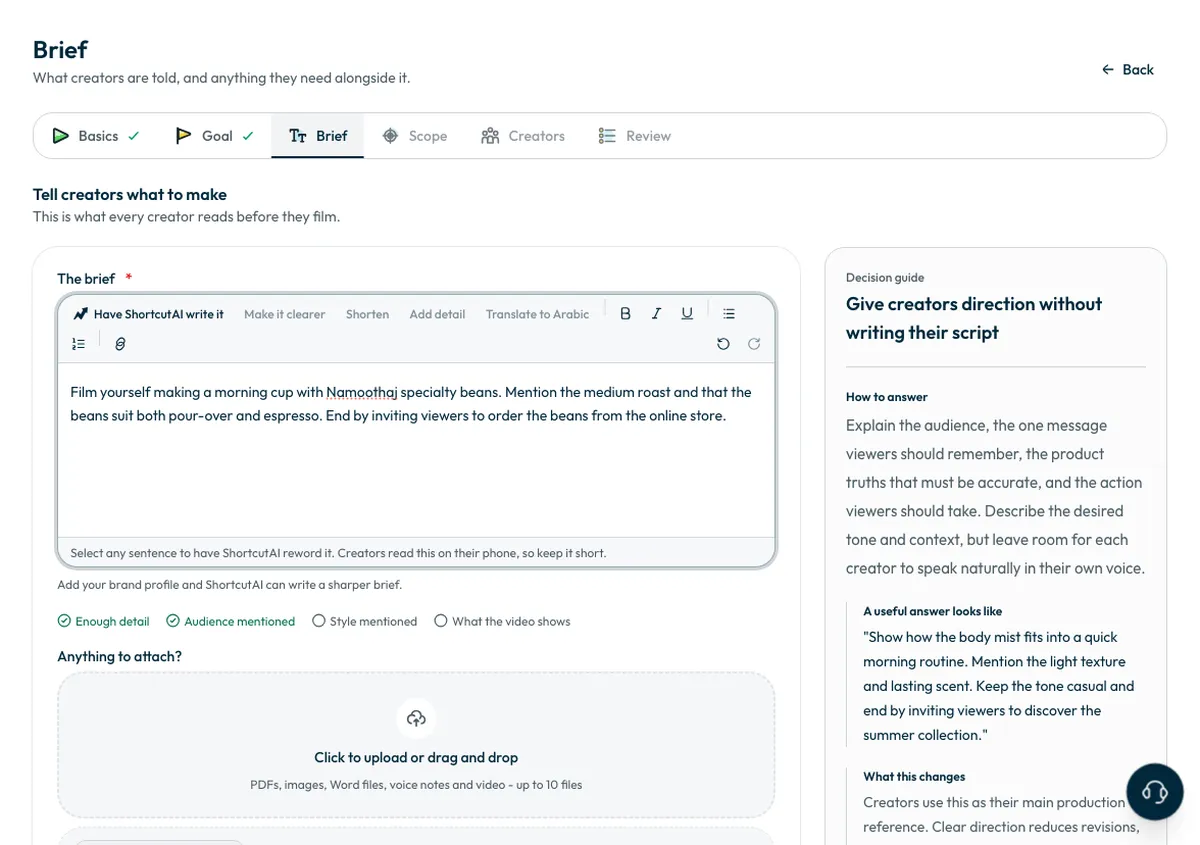
Give creators direction without writing their script. Set the tone and context, and leave them room to say it in their own voice.
Add do's and don'ts
Under “Please do” and “Please don't”, write one instruction per line, or press one of the “Ideas - tap to add”. The ready-made ideas change with the campaign goal.
Include only what can be checked in the video, such as “Show the pack name clearly for two seconds” or “Do not post before the launch date”. Precise items prevent reshoots; vague ones invite different readings.
Attach reference files
- Under “Anything to attach?”, upload PDFs, images, Word files, audio or video, up to 10 files.
- You can record a voice note of up to five minutes instead of typing, with “Record a voice note”. It is attached to the brief.
- Files are saved when you press “Save and continue”. If you leave the page before that, they are not kept.
Then press “Save and continue”.
When do I send the script?
You do not write the script in this step. Once creators accept, you choose on the campaign page whether ShortcutAI writes a script for each angle, or you send the brief as it is. See How do I send the script or brief to creators?
Common questions
Can I edit what ShortcutAI wrote?
Yes, every word. Creators see the brief as you save it, so read the draft and edit it before you continue.
Why didn't ShortcutAI write the brief?
If an attempt fails, a message says so and nothing in the brief changes. Try again, or write it yourself.
Can I write the brief in English?
Yes. You can also translate the text from the toolbar.
Next step
Set the number of creators and the campaign dates. To see the platform's other AI tools, read ShortcutAI features.
Did this article answer your question?
Thank you. We use your answer to improve the article.
Your answer could not be saved. Try again.
Need more help?
Contact our support team, and we will help you with your question.