The difference is how the creator reaches your product or service: it is sent to their home, they visit your store, or they try your website or app. You choose in the “Goal” step when you create the campaign, and one campaign can combine more than one way.
| Way | What happens | When it suits you |
|---|---|---|
| Product seeding | The product reaches the creator, who tries it and films in their usual setting. | When the product can be shipped and tried at home, such as beauty, food, fashion or electronics. |
| Store visit | The creator visits a store or venue you choose and films the visit. | When the place is part of the experience, or the service must be experienced in person, such as restaurants, clinics and events. |
| Digital experience | The creator uses your app or website and shows it in the video. | When your product's value shows in a clear digital journey, such as signing up or ordering in the app. |
Why do the choices in the Goal step matter?
This step shapes the whole campaign. Your choices affect:
- Creator recommendations: creators' prices for the way you chose are what you see, because each creator prices each way separately.
- Cost: the number of creators, the way of working and any product money you add change the total you see before paying. See How are creator prices and campaign costs worked out?
- The brief: ShortcutAI, the platform's AI assistant, reads the campaign goal when it writes your brief, and the ready-made ideas in the “Please do” and “Please don't” lists change with the goal.
- Logistics: shipping, or branches and visit codes, or the links creators open.
You can change these choices before you book creators.
Complete the Goal step
- Choose “Your goal”.
Under “How should creators work with you?”, tick one or more ways of working, then set “How many creators” and “Videos from each one” for each. Most campaigns use just one.
- Choose what you receive from creators under “What do you want back?”.
- Press “Save and continue”.
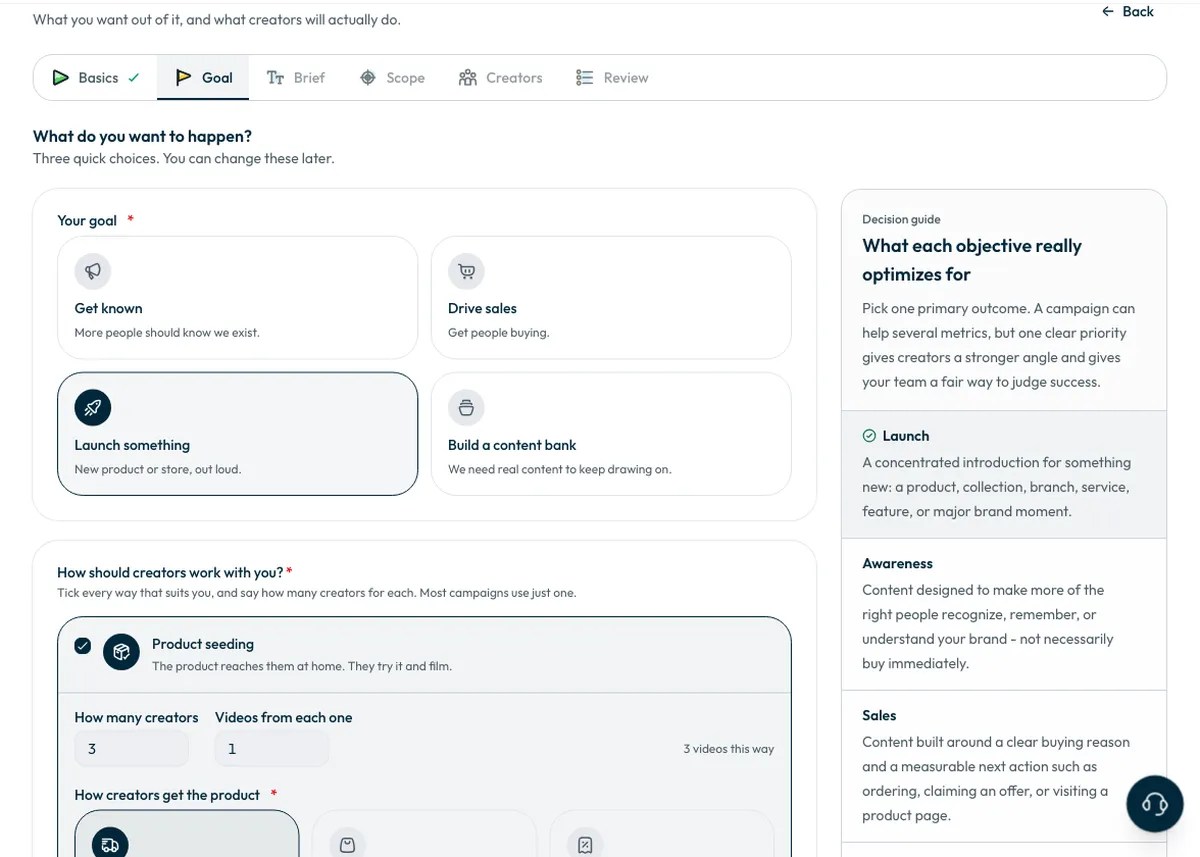
“Your plan so far” adds up the creators and videos, and that total carries into the Scope step.
Campaign goals
Pick one primary outcome. A campaign can help several goals, but one clear priority gives creators a sharper direction and gives your team a fair way to judge success.
- “Get known”: reach more of the right people.
- “Drive sales”: get people buying or using an offer. Have the price, offer and order link ready before launch.
- “Launch something”: introduce a new product, service or branch within a set launch window.
- “Build a content bank”: produce material your brand can use on its own channels, without requiring creators to post it.
How do creators get the product with seeding?
- “Shipped by brand”: you ship it to each creator and record the shipment and tracking number on the platform. See How do I ship the product to creators?
- “Creator buys the product”: you set the “Product money per creator”. It starts from the product's “Retail price” if you entered one. The amount is added to each creator's price, with VAT charged on it at checkout, and reaches them in full inside their payout.
- “Discount code”: you add a separate code for each creator to get the product, with “How to use the code” and the “Link where the code is used”. No two creators share a code. Adding codes is optional now; you can add them after booking, and each creator gets their code when they accept.
If the product is digital, shipping is not offered, and you pick another way for creators to get it.
You can also add a link under “Where should viewers go? (optional)”, such as an app download or order page. Creators see it with the brief.
Store visits: branches and visit codes
- Under “Which branches should creators visit?”, choose “Specific branches” and add a city and a Google Maps link for each, or choose “Any branch” so each creator visits your nearest branch in their own city.
- The branches' country starts with your brand's country, and you can change it if the branches are elsewhere.
- Visits are confirmed at the branch: the creator shows a short code, and your staff enter it through a link you share with them, with no account or login.
- Under “Visit codes”, choose “Shortcut generates them” so each booked visit gets a 6-character code nobody knows before the creator shows it. Or choose “We provide our own codes” if your till only recognises codes from your own system. With the second option your staff know the codes in advance, and any visit closed with one still comes out of your budget.
What do you receive?
You receive the video file in every case. What changes is publishing and reach to the creator's audience.
- “Creator post”: the creator publishes on their own account, and you get the post link and the video file. It suits you when the creator's audience is part of the campaign's value.
- “UGC video”: you get the video file only, and the job ends when you approve it. It suits you when you need content to publish on your brand's channels.
- “Post + raw footage”: the creator posts and also sends the original camera file, without music, text or filters, so you can re-edit it.
Common questions
Can I combine product seeding and store visits?
Yes. Tick both ways and set the creators and videos for each.
Can I change the goal after choosing it?
Yes. You can change this step's choices before you book creators.
Who pays for the product if the creator buys it?
You do. You set the product money, it is added to each creator's price with VAT at checkout, and it reaches them in full.
Next step
Write the campaign brief, or go back to the campaign steps.
Did this article answer your question?
Thank you. We use your answer to improve the article.
Your answer could not be saved. Try again.
Need more help?
Contact our support team, and we will help you with your question.