In the “Scope” step you set the size and length of the campaign: how many creators you need, which account sizes, and when the campaign starts and ends. A rough figure is enough here, because you see each creator's price and the total before paying.
How do these choices change your campaign?
- Count: the number of creators sets your reach and the variety of videos you receive. The total rises with every creator you book, because it is worked out from the prices of the creators you book.
- Account sizes: if you pick sizes, ShortcutAI, the platform's AI assistant, recommends creators within those sizes only, and browsing opens on them too.
- Dates: they set the window the campaign runs in and the day you need the videos. Tight dates can reduce how many creators are available.
To see what sets the campaign's price, read How are creator prices and campaign costs worked out?
Steps
- Check “How many creators?”. If you built a plan in the Goal step, its total shows here. If you did not, pick the number that fits your goal and budget.
- Choose “Creator sizes” if you want recommendations limited to those sizes. This is optional, and you can widen it later while browsing creators.
Set the dates: pick “A week”, “Two weeks” or “A month” to start today, or choose the start and end dates yourself.
- If you need the videos by a certain day, pick it under “Need the videos by a certain day?”. It falls between the start and end dates. Leave it blank if you have no fixed date.
- Press “Save and continue”.
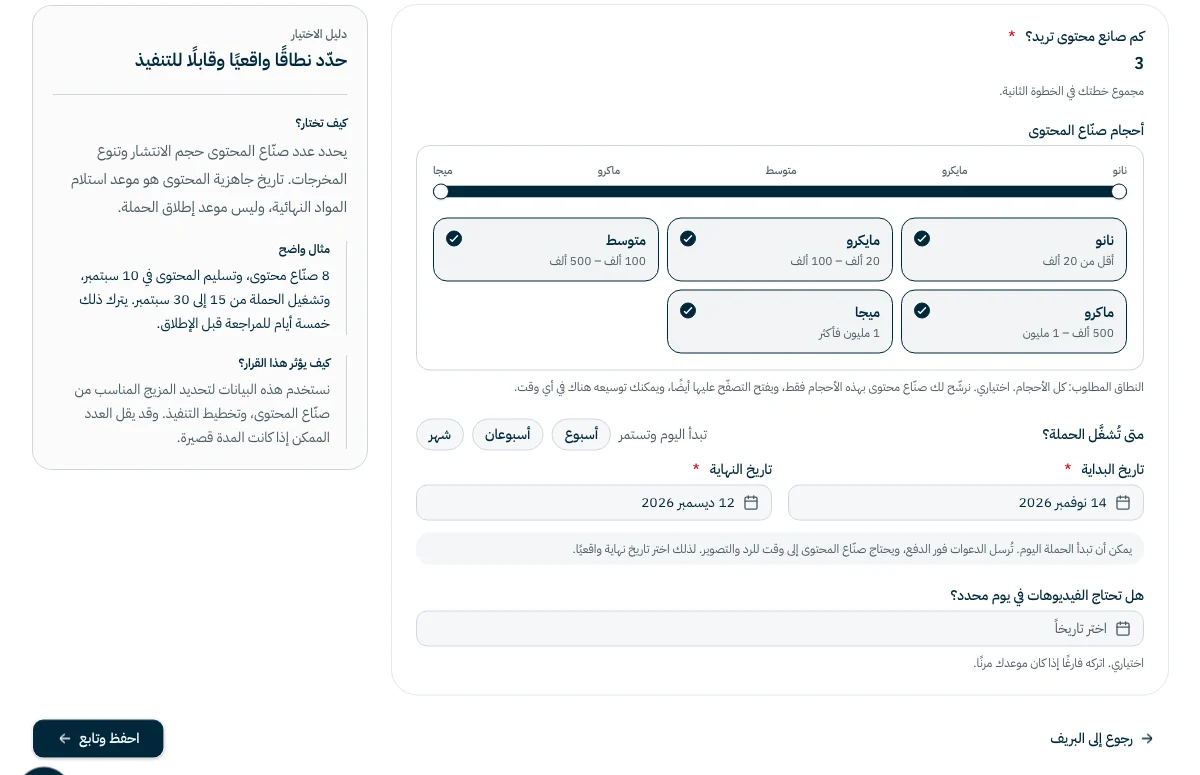
Account sizes
| Size | Followers |
|---|---|
| Nano | Under 20K |
| Micro | 20K–100K |
| Mid | 100K–500K |
| Macro | 500K–1M |
| Mega | 1M+ |
A bigger account does not always mean a better result. On the creator selection page you can compare each creator's engagement with creators their own size, so the strongest in each size stand out.
Pick a realistic video date
Invitations go out the moment you pay. Each creator has 48 hours to reply to the invitation, then needs time to film, and you need time to review. See How long does a campaign take from payment to videos?
The video date is when you receive the final material, not when your campaign goes live. If you plan to launch on 15 September, for example, pick a video date a few days earlier to leave time for review.
Common questions
Can the campaign start today?
Yes. Invitations go out the moment you pay, but creators need time to reply and film, so pick a realistic end date.
Do I have to book the full number?
No. You can book fewer than you set and add more creators at any time.
Is the number I set here binding?
No. It is an estimate that guides recommendations, and nothing is charged until you choose creators and pay.
Next step
Did this article answer your question?
Thank you. We use your answer to improve the article.
Your answer could not be saved. Try again.
Need more help?
Contact our support team, and we will help you with your question.