You contact the support team by sending a support request from the “Support” page in your account, or from the support chat you can open on any page. All messages stay in the same request, so you can follow them at any time.
Each team member sees the requests they opened themselves, and the account owner sees all of the company's requests.
Where is the fastest answer?
- For questions about your campaigns, such as who has posted, who is late and what is waiting for your approval, ask the “ShortcutAI summary”, the platform's AI assistant. It answers straight from your account's figures. See how to use the ShortcutAI summary.
- For how-to steps, search this help center.
- For anything that needs the Shortcut team to act, send a support request.
Send a request
- In the sidebar, press “Support” under “Help”.
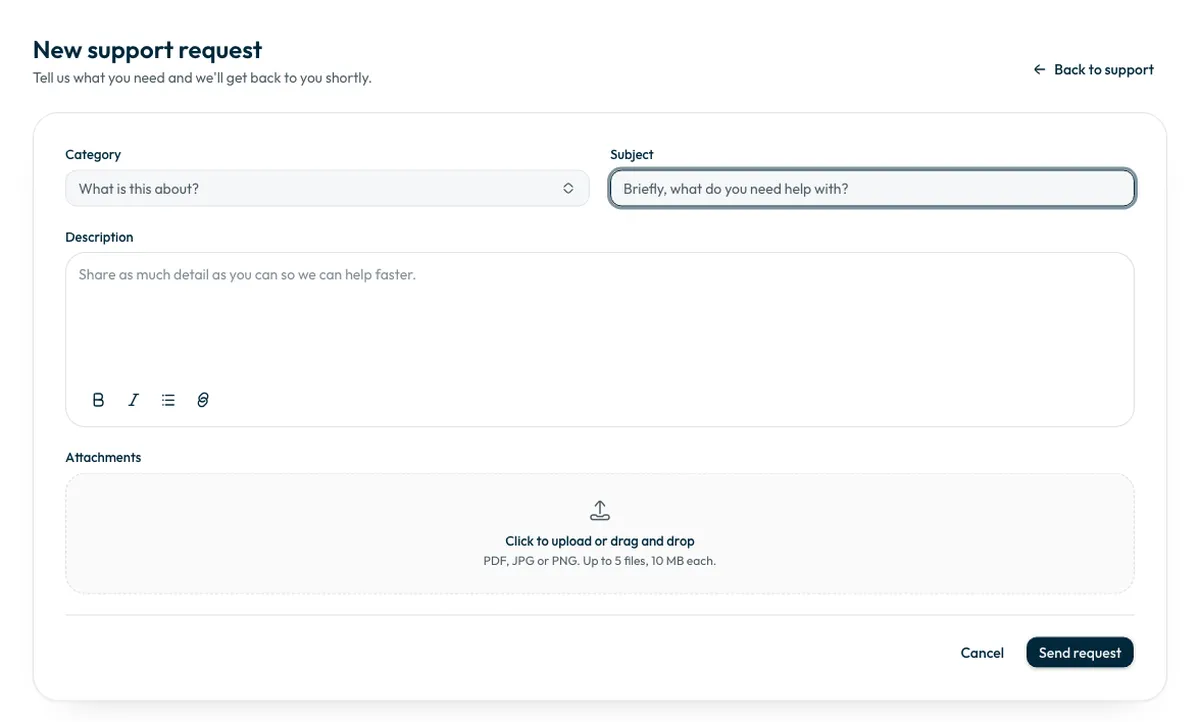
Press “New request”. The “New support request” page opens.
- Choose a “Category” and write a short “Subject”.
- Write the “Description”, including the campaign name, the creator's name and what happened.
- Attach files in “Attachments” if needed: up to 5 PDF, JPG or PNG files, 10 MB each.
- Press “Send request”.
Why name the campaign and the creator?
The support team needs to know the campaign and where the problem happened before it can act. A clear description and a screenshot save a round of follow-up questions.
If you open the request with “Contact our team” inside a campaign, the request page opens with the campaign already named.
Support chat on any page
Your account pages carry a round support button. Press it to open “Support”, then choose “New conversation” or open an earlier one. These conversations are your support requests, so anything you write there also appears on the “Support” page.
Follow your request
- Your requests are listed on the “Support” page with their status, such as “Open”, “Awaiting your reply” or “Solved”.
- Open a request to read the reply and send a new message.
- When your problem is solved, press “Mark as solved”. You can then rate the service.
- If a request is closed and you still need help, open a new one.
- The Shortcut team may open a request for you. It appears in your list marked “Opened by Shortcut for you”.
What needs a support request?
- Getting back the money held for a creator who will not finish your campaign, to your advertising balance or to your bank account by a manual transfer from the finance team. Money never goes back to the card. See balance transactions and getting money back.
- Topping up more than the limit for a single payment.
- Anything that looks broken, or a question this help center does not answer.
Common questions
Can I follow my request from another page?
Yes. Open the support chat from the round button on any page, and your requests are there.
What should I attach?
A screenshot of the problem, or any document that explains it. A request takes up to 5 PDF, JPG or PNG files, 10 MB each.
Did this article answer your question?
Thank you. We use your answer to improve the article.
Your answer could not be saved. Try again.
Need more help?
Contact our support team, and we will help you with your question.