ShortcutAI is an AI assistant in your account. It answers your questions from your own campaign data, suggests ideas for your next campaigns, and reminds late creators once you confirm.
Instead of opening every campaign and gathering the figures yourself, ask one question and get the answer with a link to the page it comes from.
What can ShortcutAI do for you?
- Summarise where your campaigns stand today: who has published, who is late and why, and what is waiting on your approval.
- Show your top videos with their ad codes, explain why they worked or fell short, and tell you what people are saying in the comments.
- Write a campaign report, or a summary to send your manager.
- Suggest ideas for a new campaign from your brand profile and past campaigns.
- Suggest replacements for a creator who came off a campaign.
- Remind late creators on WhatsApp, after you confirm.
Ask a question
In the sidebar, open “ShortcutAI summary” under “Quick access”.
- Choose “All campaigns” or a specific campaign.
- Type your question, or press one of the “Questions to start with”.
- Press “Send”.
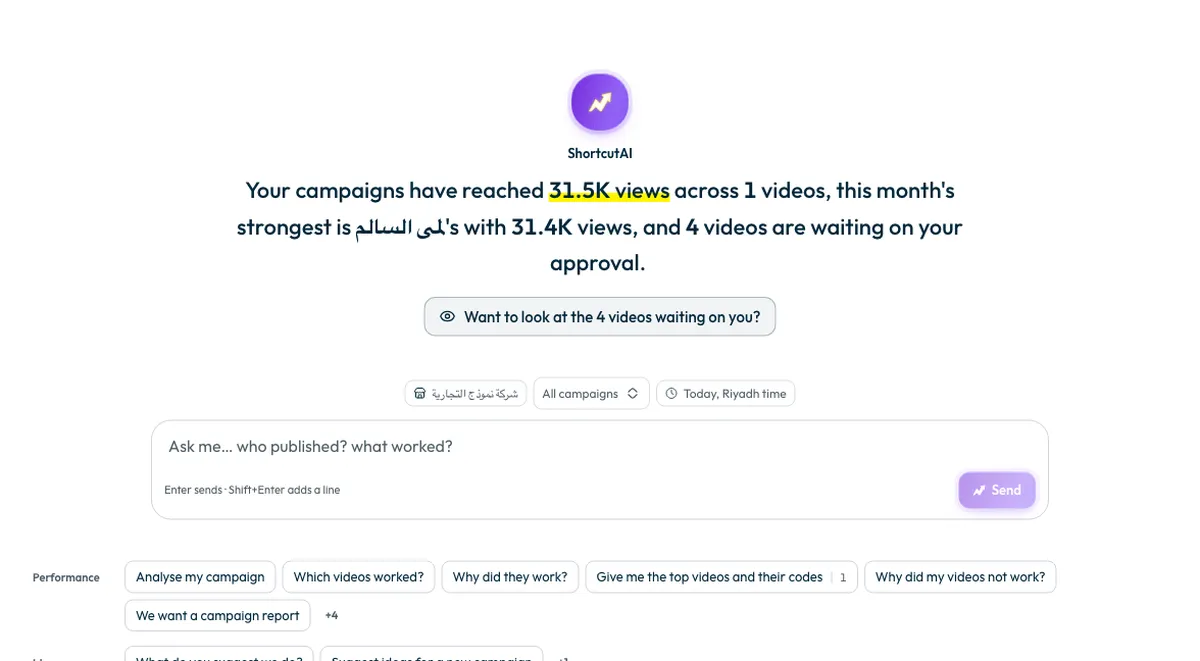
To adjust an answer, press “Shorter”, “More detail” or “In English”. To start a new topic, press “New chat”. Your earlier questions are under “What you asked last”.
Examples from the suggested questions
- Status: “Who's late?”, “What's pending?”, “Who has published?”, “What's waiting on my approval?”.
- Performance: “Analyse my campaign”, “Give me the top videos and their codes”, “Why did they work?”, “Is anyone asking where to buy?”, “We want a campaign report”.
- Ideas: “What do you suggest we do?”, “Suggest ideas for a new campaign”, “What should we change next campaign?”.
- Actions: “Remind the late ones for me”, “Find me a replacement”.
Suggested questions depend on your account, so a question with no data to answer it is not shown.
Does ShortcutAI send anything without my permission?
No. The assistant only reads your own data, and nothing goes out to creators until you confirm.
- When you ask it to remind late creators, it shows who will be reminded, the campaign, and the message.
- Press “Send the reminder”, then confirm. The reminder goes on WhatsApp from Shortcut's official number.
- It skips anyone already reminded today and anyone who has had all three reminders, and tells you so.
Only the “Owner” and “Admin” roles can confirm a reminder. See How do I follow creators’ progress and remind late ones?
Daily usage limit
ShortcutAI has a daily usage limit. When it cannot answer, including when that limit is reached, you see “ShortcutAI cannot answer right now. Everything is still on your campaign pages.” All your data stays on your campaign pages, and you can use the assistant again the next day.
Common questions
Where do the assistant's figures come from?
From your own account data: the same figures shown on your campaign pages.
Can I delete a conversation?
Yes. The conversation and everything said in it are deleted.
Does the assistant review videos for me?
No. It tells you what is waiting on your approval, but approving or requesting a change is your decision. See How do I approve a creator’s video or ask for changes?
Next step
For ShortcutAI's read of each campaign's results, see How do I read my campaign results and find the best videos? To use ad codes, see What are TikTok Spark Ads?
Did this article answer your question?
Thank you. We use your answer to improve the article.
Your answer could not be saved. Try again.
Need more help?
Contact our support team, and we will help you with your question.