Spark Ads are TikTok ads that promote an original post from a creator's account, paid for from your own ad account. The ad appears under the creator's name and account, not your brand's.
The ad code (Spark Ads) is the permission the creator gives you to promote their post. On Shortcut, the code arrives with the link of every TikTok post, without you having to ask for it.
Why use Spark Ads with UGC content?
- The ad looks like a natural post from a creator, not an ad from a brand. That is the core of UGC content and influencer marketing.
- The post itself is promoted, so the engagement it earns stays on the creator's original post.
- You promote a video that has already proven itself organically, instead of betting on a new, untested ad.
What is the ad code?
The ad code is a string the creator generates in the TikTok app for a specific post, and it starts with #. It allows an ad account to run that post as an ad. The platform calls it the “Ad code”; TikTok calls it a Spark code.
See Where do I find post links and ad codes?
How do I get the ad code from the creator?
- When creating the campaign, choose a collaboration that includes posting: “Creator post” or “Post + raw footage”. See How do I choose the campaign goal and collaboration?
- Once you approve the video, the creator posts it on their TikTok account.
- The creator sends the post link together with the ad code. A TikTok post link is not accepted without the code.
In “UGC video” campaigns the video is not posted, so there is no ad code.
Where does the code appear on Shortcut?
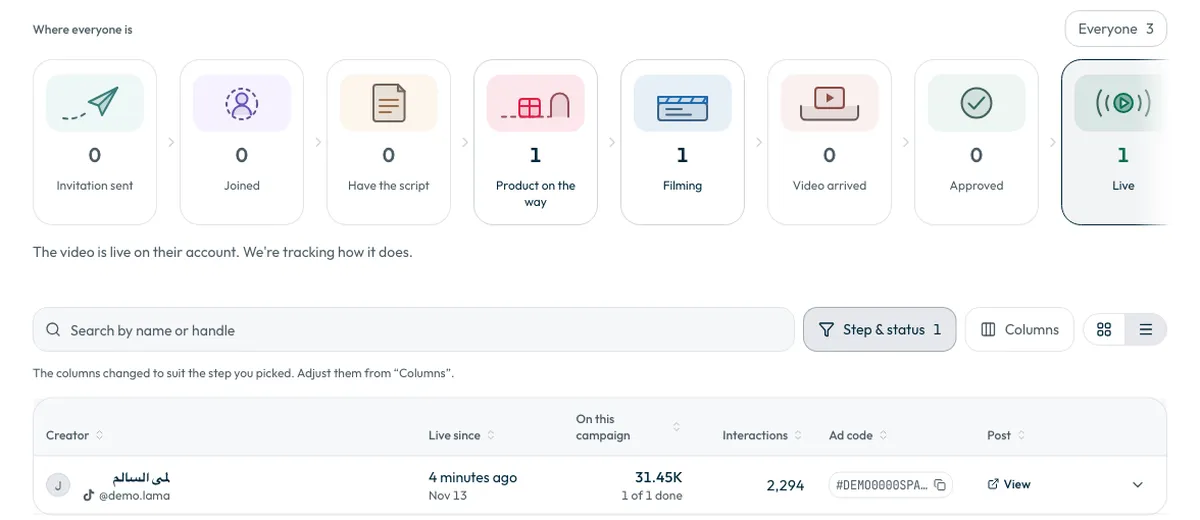
Open the campaign, then the “Campaign cycle” tab, and press the “Live” card. The code is in the “Ad code” column, and you can copy it with the copy icon beside it.
- To download every code with its link, open the “Performance” tab and press “Download” next to “Published videos”.
Pick the video worth promoting with ShortcutAI
Before you spend on ads, find out what worked. Ask ShortcutAI, the platform's AI assistant: “Give me the top videos and their codes”. It shows your best-performing videos, each with a “Copy the promo code” button.
The “ShortcutAI insights” tab explains why each video got its result and what the audience asked in the comments. See How do I read my campaign results and find the best videos?
How do I use the code on TikTok?
These steps happen in TikTok Ads Manager, not on Shortcut. We describe them in general terms, and TikTok's labels and screens may differ.
- Sign in to your TikTok Ads Manager account.
- Add the creator's post to your ad account using the ad code. TikTok usually shows the post and the account name so you can check it.
- Create an ad campaign and choose the added post as the ad's content.
- Set the audience, budget and schedule, then publish the ad.
If Ads Manager does not accept the code
- Make sure you copied the whole code, including the # at the start.
- On TikTok the creator sets how long the authorisation lasts, and it can expire or be withdrawn. A new code is then needed.
- Contact the support team with the campaign name and the creator's name. See How do I contact support?
Common questions
Is the ad run from inside Shortcut?
No. Shortcut gives you the code; you create the ad and pay for it in TikTok Ads Manager from your own ad account.
Do I need to ask the creator for the code?
No. The creator sends it with their TikTok post link.
What does “Not shared yet” mean in the code column?
No code is recorded for this post yet. Contact the support team.
Did this article answer your question?
Thank you. We use your answer to improve the article.
Your answer could not be saved. Try again.
Need more help?
Contact our support team, and we will help you with your question.