You read campaign results in two places on the campaign page: the “Performance” tab for the figures, and the “ShortcutAI insights” tab for what the audience said and what ShortcutAI, the platform's AI assistant, writes about the campaign.
The figures come from TikTok. A new post starts showing figures after about a day, and they settle over the following days.
Why read the results?
Results tell you which creators and which ideas worked with your audience. You use them to choose who to work with again, what to change in your next brief, and which video is worth running as a paid ad.
Open the figures
Open the campaign, then the “Performance” tab.
- To request the latest figures, press “Refresh the numbers” at the top of the tab.
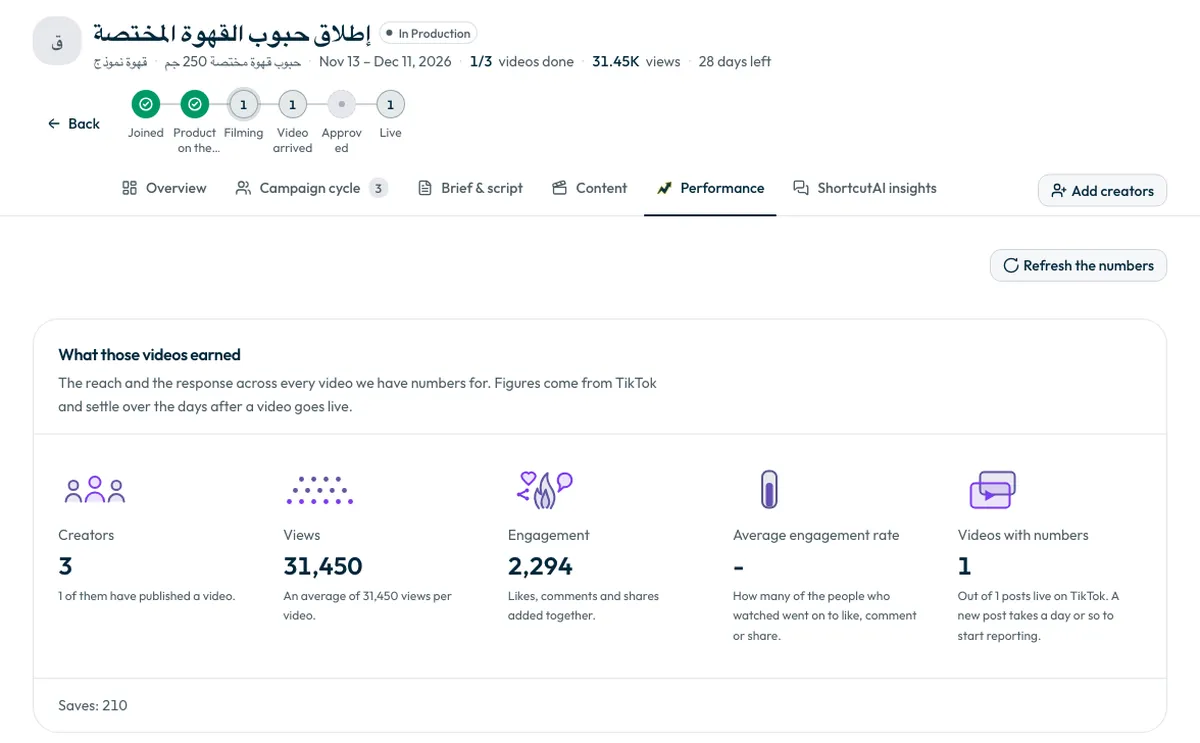
What the Performance tab shows
- “What those videos earned”: creators, views, engagement (likes, comments and shares), average engagement rate, and how many videos have figures.
- “Views by publish day”: each video is counted on the day it went live, with all its views since. This chart is not a daily view counter.
- “Your best videos”: the five with the most views, and the five with the strongest engagement for their views. The engagement ranking only includes videos above 10,000 views.
- “How each creator did”: every creator whose post is live and has figures, most viewed first.
Each video's figures on the “Content” page
For a quick look at the videos of all your campaigns without opening each one, open the “Content” page from the sidebar. Published videos appear under “Live”, and each video's card shows its views and likes once its figures arrive.
The page shows each video's own figures. Totals, your best videos and each creator's performance are in the “Performance” tab inside the campaign.
Download the results
- “Campaign report”: the full report of creators, videos and figures, in Arabic or English.
- “Published videos”: a spreadsheet of every live video with its link, creator, views and ad code. You can choose the columns before downloading.
What does the ShortcutAI insights tab show?
This tab reads the comments under the TikTok videos published in your campaign, and shows:
- “How your audience read the campaign” and “What people asked”: comments asking about price, stock, where to buy or how to order, and when they arrived after posting. Write your answer beside each question and it is saved on the campaign for your team. It is not passed to the creator automatically.
- “What we learned”: ShortcutAI's read of the whole campaign, with “What worked”, “What to change” and “For the next round”, plus “How the comments felt” and “What people talked about”.
- “What is worth doing about it”: the moves your results point to, most pressing first, each with the videos it was read from.
- “Why each video did what it did”: a read of each video, covering what carried it, “What held it back”, and what to do differently next time.
When do the insights appear?
- Audience questions start appearing after a video's first day. A reply on day one reaches far more people.
- Each video is analysed once its figures settle, about a week after it goes live.
- ShortcutAI writes the campaign read for the first time when half the campaign's videos are live, and updates it when they all are.
If you see “This campaign is not being read yet”, analysis is off for this campaign. It is on automatically for new campaigns; for an older one, contact the support team.
Common questions
Why do the figures differ from what I see on TikTok?
Figures are refreshed at intervals. Press “Refresh the numbers” for the latest, and remember a new post's figures take days to settle.
Does my answer to an audience question reach the creator?
No. The answer is saved for your team on the campaign page only.
Next step
To run your best videos as paid ads, see Where do I find post links and ad codes? and What are TikTok Spark Ads? For a direct answer, such as “Give me the top videos and their codes”, see How do I use ShortcutAI to follow my campaigns?
Did this article answer your question?
Thank you. We use your answer to improve the article.
Your answer could not be saved. Try again.
Need more help?
Contact our support team, and we will help you with your question.