You find post links and ad codes in the “Campaign cycle” tab, under the “Live” card. You can also download them all in one file from the “Performance” tab.
An ad code is generated by the creator on the publishing platform. It lets you run their post as a paid ad from your own ad account. On TikTok it is called a Spark code.
Why does the ad code matter?
With the code you promote the video from the creator's own account, not from your brand's account. The ad shows under the creator's name, and the engagement stays on their original post. To learn more, see What are TikTok Spark Ads?
When do you get the ad code?
- On TikTok: the creator sends the code with the post link after publishing, and the link is not accepted without it.
- In “UGC video” campaigns: there is no post and no code. You download the video file after approval.
See links and codes
- Open the campaign, then the “Campaign cycle” tab.
Press the “Live” card. The table shows “Live since”, “Interactions”, “Ad code” and “Post”.
- To copy a code, press the copy icon beside it. To open the post, press “View”.
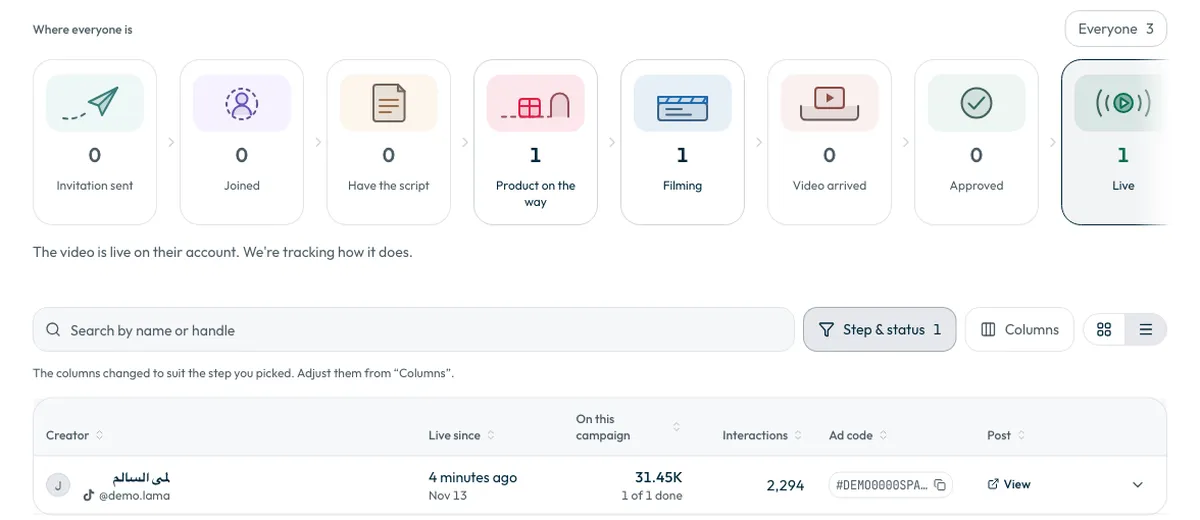
If you see “Not shared yet”, no code is recorded for this post yet. Contact the support team with the campaign name and the creator's name.
Open the posts of all your campaigns from the “Content” page
The “Content” page in the sidebar gathers the videos of all your campaigns in one place. Published videos appear there under “Live”.
- On a published TikTok video, the “TikTok” button on the video's card opens the post itself.
- The “Download” button on the card downloads the video file. To download several videos at once, select them, then press “Download videos”.
The “Content” page does not show ad codes. To copy a code, open the campaign as in the steps above.
Download all links and codes
In the “Performance” tab, press “Download” next to “Published videos”. By default the file includes the creator, handle, link, ad code and views.
Ask ShortcutAI for the codes
Ask ShortcutAI, the platform's AI assistant: “Give me the top videos and their codes”. It shows your best-performing videos, each with a “Copy the promo code” button, so you start by promoting what actually worked. See How do I use ShortcutAI to follow my campaigns?
Discount codes are not ad codes
The discount codes creators use to get the product are the ones you add when creating the campaign. Creators do not generate them.
Common questions
Do I need to ask the creator for the code?
No. The creator sends it with the TikTok post link.
Can I promote a video from a “UGC video” campaign?
That video has no post and no ad code. You download the video file after approval.
To pick the videos most worth promoting, see How do I read my campaign results and find the best videos?
Did this article answer your question?
Thank you. We use your answer to improve the article.
Your answer could not be saved. Try again.
Need more help?
Contact our support team, and we will help you with your question.