You find tax invoices on the “Advertising balance” page, under the “Tax invoices” tab.
An invoice is issued for each advertising-balance top-up, not for each campaign. It carries the billing details you entered for your company.
Why is the invoice per top-up?
You pay once when you top up your balance, then book creators from it on any campaign. So the invoice follows the payment itself, not the campaigns that used the balance. This includes the payment you complete at booking when your balance is short, which is a top-up too.
Download an invoice
- In the sidebar, open “Workspace”, then “Advertising balance”.
Choose the “Tax invoices” tab.
- Press “Download” next to the payment.
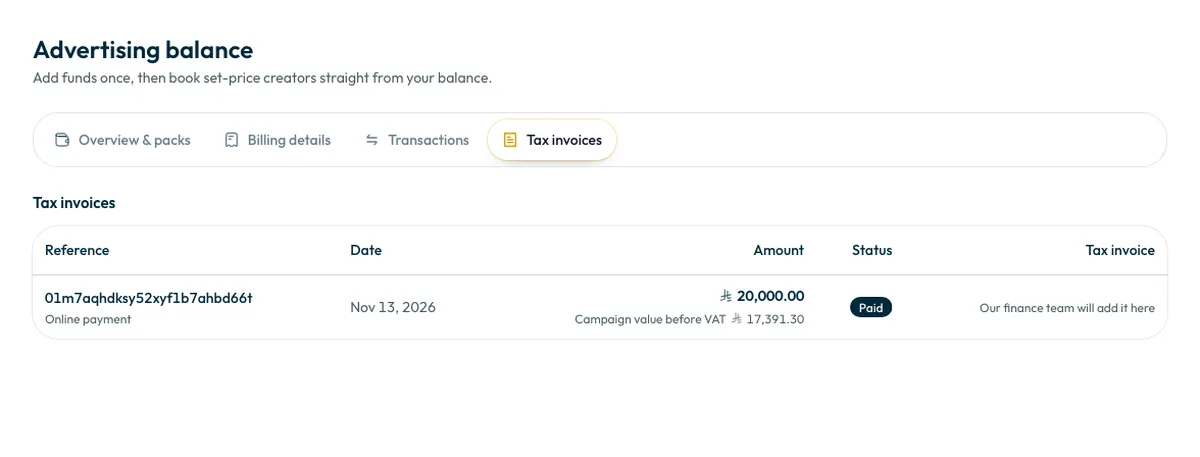
What the table shows
- “Reference”: the invoice number once issued, with the payment method below it.
- “Date”: the payment date.
- “Amount”: the amount including VAT, with its value before VAT below it.
- “Status”: such as “Paid”.
The tab lists paid top-ups only. A payment attempt that did not complete gets no invoice.
If there is no download button
If you see “Our finance team will add it here” instead of “Download”, the invoice has not been uploaded yet. The finance team issues the invoice on the certified invoicing system, then uploads it to your account with its number. The download button appears once it is uploaded.
Common questions
Is there a separate invoice for each campaign?
No. An invoice is issued for each advertising-balance top-up.
Can company details be changed on an issued invoice?
Your billing details are copied onto the invoice when it is issued, so check them before topping up, and contact the support team if you find a mistake on an invoice.
Next step
To add or correct your billing details, see How do I add my billing details and commercial registration? To top up, see How do I top up my advertising balance?
Did this article answer your question?
Thank you. We use your answer to improve the article.
Your answer could not be saved. Try again.
Need more help?
Contact our support team, and we will help you with your question.