Your advertising balance is the money you book creators from. You top it up on the “Advertising balance” page and use it for any campaign of any brand in your account.
The amount you pay includes VAT, and your balance goes up by the same amount.
Why top up an advertising balance?
- You book creators straight from your balance, with no bank transfer to wait for, so invitations reach them as soon as you pay.
- There is no monthly subscription. You add funds when you want to, and they stay until you use them.
- You top up once and book across several campaigns, with one tax invoice per top-up, not one per campaign.
Before you start
- Complete your billing details, because every top-up gets a tax invoice in your company's name. See how to add your billing details.
- You need the “Owner” or “Admin” role. Members can see the balance but cannot top it up.
Top up the balance
- In the sidebar, open “Workspace”, then “Advertising balance”.
- Under “Add funds”, press “Add funds” on a pack, or press “Enter another amount” and type any amount from 1 to 500,000 SAR.
Check the window: “Campaign value before VAT”, the VAT, “Total payable”, and the amount added to your balance.
- Press “Pay”, then complete the payment on the payment provider's secure page.
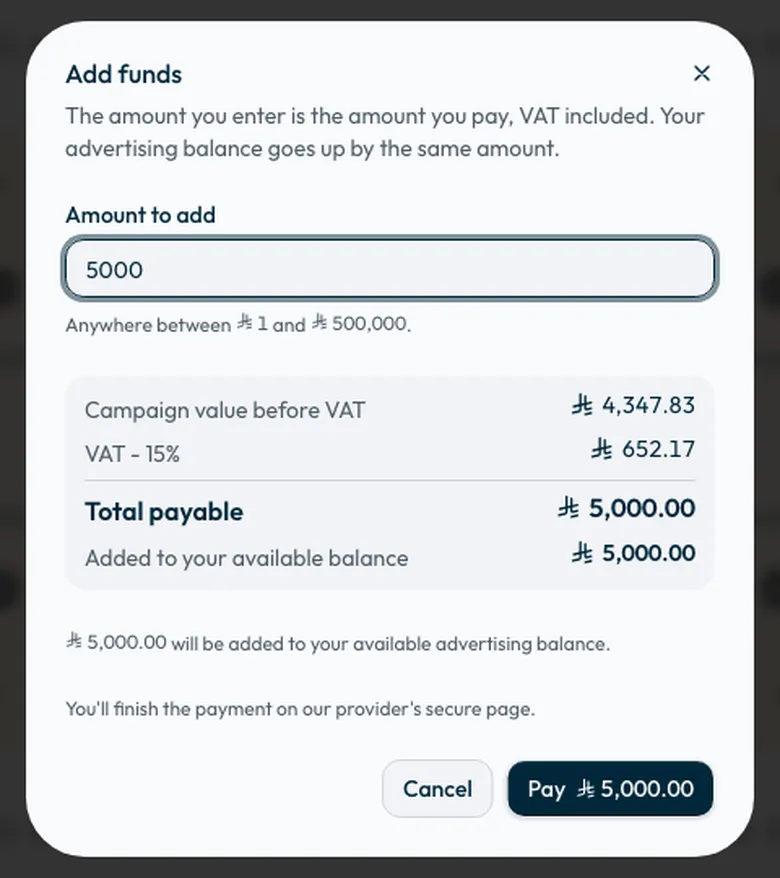
Once paid, the amount is added to your “Available balance” and appears under “Transactions” and “Tax invoices”.
Each pack shows a rough number of videos it covers. That figure is a guide, not a commitment, because what a video costs depends on the creators you pick and the type of engagement. See How much does a creator campaign cost on Shortcut?
If the payment did not finish
- The page shows a top-up waiting for payment. To complete it, press “Finish payment”. To cancel it, press “Cancel this top-up”. Cancelling charges you nothing.
- If your bank declines the payment, nothing is charged and no creator is booked. You can try again.
Paying while you book
You do not have to top up before you book. If you press “Book and pay” and your balance does not cover the total, the pay button in the “Book them now” window changes to “Pay [amount] by card and book them”.
If you have some balance, it covers part of the total, and you pay the rest by card on the payment provider's page. Once the payment is accepted, the creators you chose are booked automatically, without paying again.
If the difference is below the smallest amount the payment provider accepts, the extra stays in your balance for your next campaign. If the amount is more than one payment can take, contact the support team.
Details: booking and paying for creators.
Common questions
Does the balance expire?
No. Your advertising balance never expires.
Can I use one balance for more than one brand?
Yes. The balance belongs to your company account, and you book from it on any campaign for any of its brands.
Do refunds go back to the card?
No. Money returned on Shortcut goes back to your advertising balance, or to your bank account by a manual transfer from the finance team. See How do I review my advertising balance and get money back?
When is the tax invoice issued?
A tax invoice is issued for each top-up, and you find it in the “Tax invoices” tab. See tax invoices.
Did this article answer your question?
Thank you. We use your answer to improve the article.
Your answer could not be saved. Try again.
Need more help?
Contact our support team, and we will help you with your question.