UGC (user-generated content) is video that creators make about your product or service in their own style, instead of an ad your brand produces itself. It shows a person using the product and talking about it in their own words, so the video feels closer to a real experience than to a traditional ad.
On Shortcut you order these videos from approved creators: you create a campaign, pick creators at prices shown up front, pay from your advertising balance, and approve every video before it is published. ShortcutAI, the platform's AI assistant, helps at every step.
Why do brands order UGC?
- A style close to the audience: the creator films the product in their usual setting and presents it the way their followers know.
- Material for your channels and ads: you receive the video file in every case, so you can use it on your own accounts and product pages. You can also ask for the raw footage to re-edit.
- Reach to the creator's audience: if you choose posting on their account, the video reaches their followers. On TikTok you get the post's ad code (Spark Ads), so you can run it as an ad from your TikTok ad account. See TikTok Spark Ads and ad codes.
- A clear cost: you see each creator's price before paying, and there is no monthly subscription.
Do you want videos for your own channels, or posts with influencers? See What is the difference between UGC and influencer marketing?
How does a UGC campaign work on Shortcut?
- Create a company account. No documents are needed to sign up. See how to create a company account.
- Add your brand, its website and your products. With your consent, ShortcutAI reads your website and fills in your brand details, and every later step uses them. See how to add your brand and products.
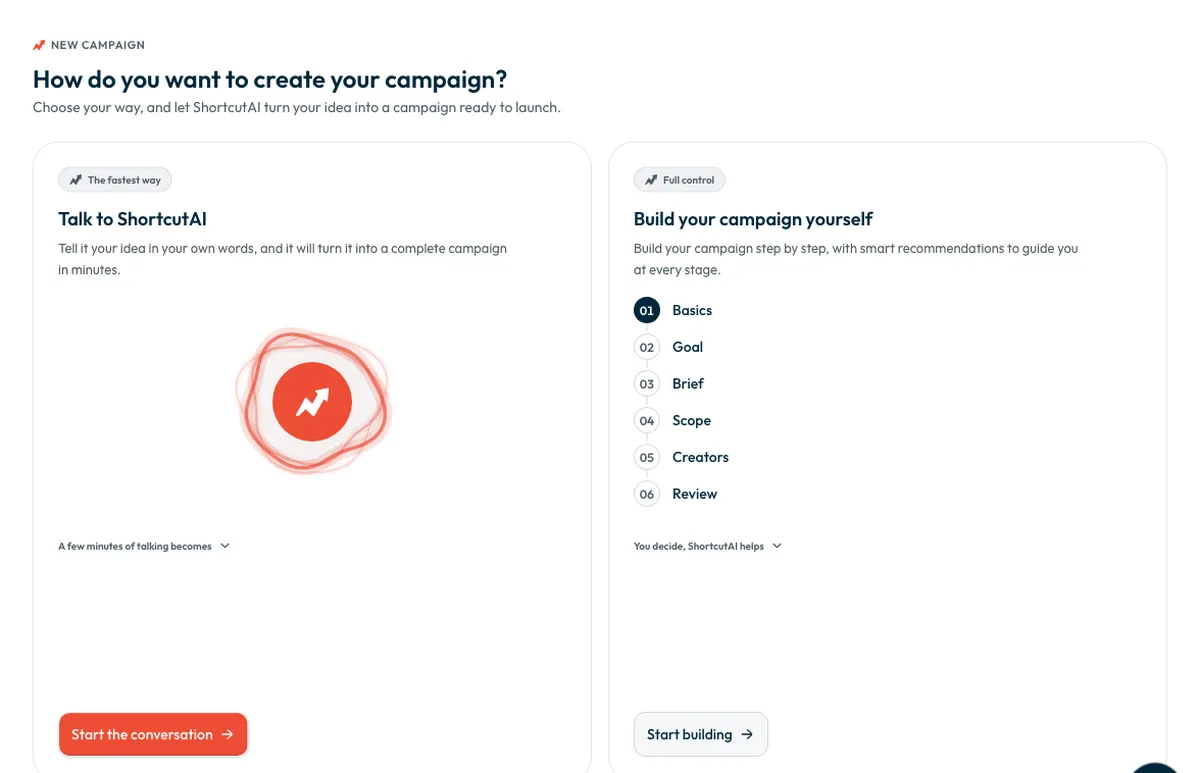
Create a campaign: choose “Talk to ShortcutAI” to describe your idea out loud, or “Build your campaign yourself” step by step: “Basics”, then “Goal”, then “Brief”, then “Scope”. Under “Goal” you choose how creators work with you (“Product seeding”, “Store visit” or “Digital experience”) and what you want back.
- Write the brief, or press “Have ShortcutAI write it” to draft it from your brand, product and goal, then review and edit it.
- Pick creators yourself in the “Creators” step. For each one you see the account, followers, engagement rate and VAT-inclusive price. Press “See who we'd pick” to see ShortcutAI's suggestions with the reason for each.
- Choose each creator's job, then press “Book and pay”. You pay from your advertising balance, or cover the difference by card, and invitations go out as soon as you pay.
- Send the script or brief once creators accept, and ship the product if needed. ShortcutAI can write a script for each angle if you want.
- Review each video, then approve it or ask for changes. The creator posts after you approve.
- Follow views and engagement, collect post links and ad codes, and read your audience's questions in the “ShortcutAI insights” tab.
What do you receive?
You choose this in the “Goal” step, under “What do you want back?”:
- “Creator post”: the creator posts the video on their account and sends you the post link and the video file.
- “UGC video”: the creator sends you the video file without posting it, and the job ends once you approve.
- “Post + raw footage”: the creator posts the video and also sends you the original camera file with no music, text or filters, so you can re-edit it.
Who are the creators?
For your campaign, the platform shows Shortcut-approved creators who have a TikTok account and a set price for the job.
You search by name or by describing what you want, and filter by category, audience size, region, city and price. You can also show only creators who hold a Mawthooq licence. See What is the Mawthooq licence, and how do I choose licensed creators?
The final choice is always yours.
Where does ShortcutAI help?
- It fills in your brand details from its website, and product details from the product link.
- It writes the brief and the do's and don'ts, and suggests a campaign name.
- It suggests creators who fit your brief, and explains each suggestion.
- It writes scripts, and answers your questions about your campaigns from their figures.
- After posting, it reads the comments and explains why each video got its result.
You review everything it writes before it reaches creators, and reviewing the videos is your decision. Details: How does ShortcutAI help at every step of your campaign?
Common questions
Do I need a monthly subscription?
No. You pay only for the creators you book, and you see the VAT-inclusive price before paying. See How much does a creator (influencer) campaign cost on Shortcut?
Does the creator have to post the video on their account?
No. Choose “UGC video” if you only want the file for your own channels.
Is the video published before I see it?
No. You review each video, then approve it or ask for changes, and the creator posts after you approve.
How long does a campaign take?
You set its dates. Creators have 48 hours to reply to the invitation; after that, the time depends on shipping, filming and your review. See How long does a creator campaign take from order to posting?
What if a creator declines after I pay?
Their amount stays held for you until you choose a replacement. See what happens if a creator declines or drops out.
Did this article answer your question?
Thank you. We use your answer to improve the article.
Your answer could not be saved. Try again.
Need more help?
Contact our support team, and we will help you with your question.