Every invitation shows “Your fee” before you decide, and every open campaign shows its “Payout”. The fee is added to your wallet once you have posted or delivered every video the campaign asks of you.
Campaigns differ in three things shown on the campaign page: the video type, how you get the product, and what you hand in at the end. Knowing them before you accept helps you judge the time and effort involved.
Video types
Every campaign has one or more videos, and each video's type shows on its card on the campaign page. The type decides where you film and what you do first.
| Type | What it means |
|---|---|
| “Product seeding” | You film the product at home. How you get the product depends on the campaign. |
| “Branch visit” | You visit the brand's branch and film there. |
| “Digital experience” | You open the brand's link, do what it asks, and film your experience. |
The invitation page shows the fee, and each video's type on its card, such as a branch visit with the branch name:
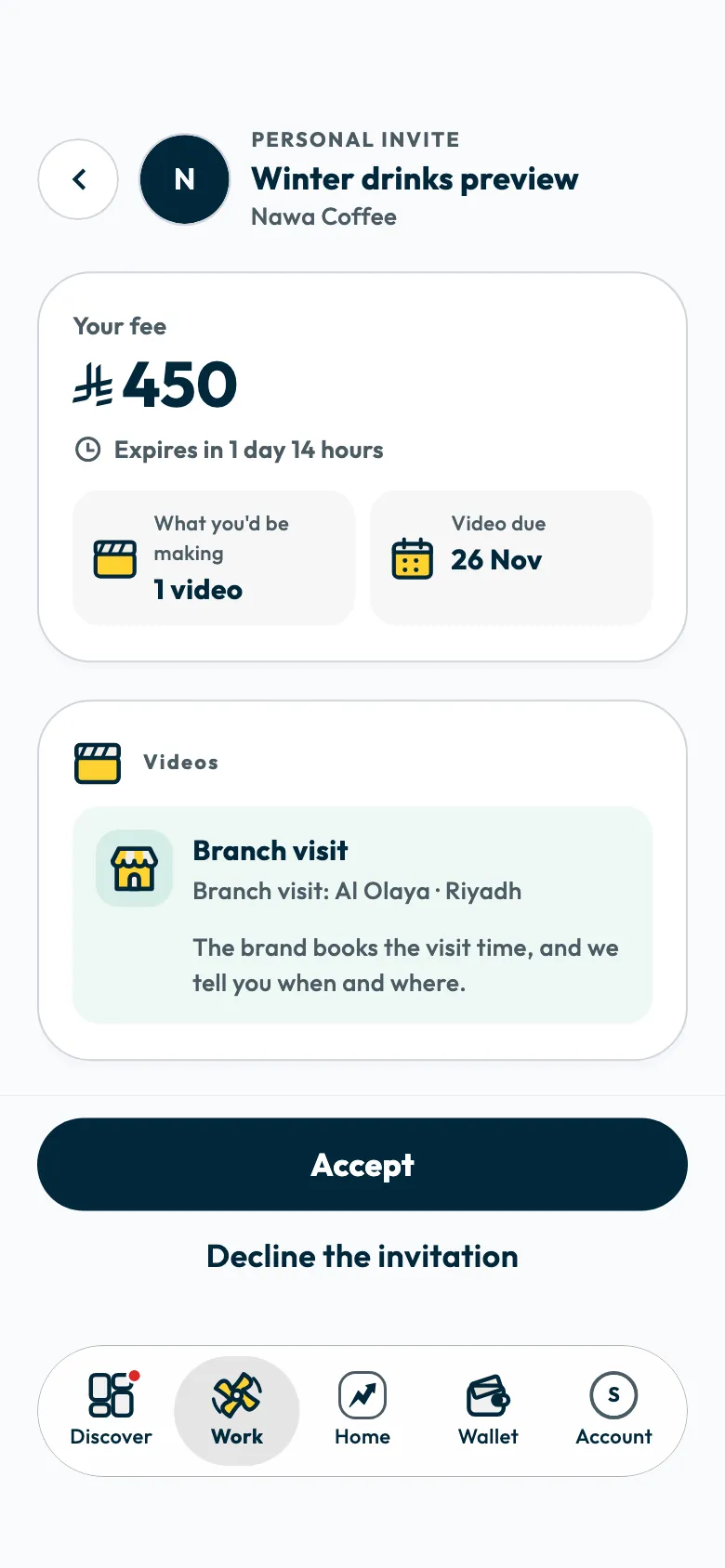
For a “Branch visit” video, the brand books your visit, or gives you a window to visit any branch before the due date. Filming opens once your attendance is recorded. See confirming or rescheduling a branch visit.
How you get the product
The campaign page shows it under “Getting the product”, as one of three ways:
- “The brand posts it to you”: the product reaches your address after you join, and you film once it arrives. Confirm it arrived, as described in confirming you received the product.
- “You buy it yourself”: you buy the product and your fee covers it. Keep the receipt; you may be asked for it.
- “You get your own discount code”: a personal code on the campaign page gets you the product. It is yours alone, so do not share it.
Posting the video or delivering it only
- “You post it on your own account”: once the video is approved, you post it on your TikTok account and send its link and ad code. See sending your video link and ad code.
- “You deliver the video only - you don't post it”: you send the video, the brand uses it as UGC content, and nothing goes on your account.
- “Plus the untouched file from your camera”: the campaign also asks for your raw footage alongside the video. See uploading your campaign video and raw file.
“Challenges” campaigns
These appear in “Discover” under “Challenges”. They are competitive campaigns where the top-ranked creators win the prizes listed on the challenge page. See points, levels and challenges.
Campaign preferences on your profile
In “Account”, then “Profile”, then “Campaign preferences”, you choose whether you accept ads paid in products or gifts, with “Accept product ads”, and whether you accept commission ads, with “Accept commission ads”. Setting these preferences is one of the requirements for your account to be approved.
Do I need a Mawthooq licence?
Yes. You need a valid Mawthooq licence to publish ads in Saudi Arabia. See Do I need a Mawthooq licence? How do I add it?.
Did this article answer your question?
Thank you. We use your answer to improve the article.
Your answer could not be saved. Try again.
Need more help?
Contact our support team, and we will help you with your question.