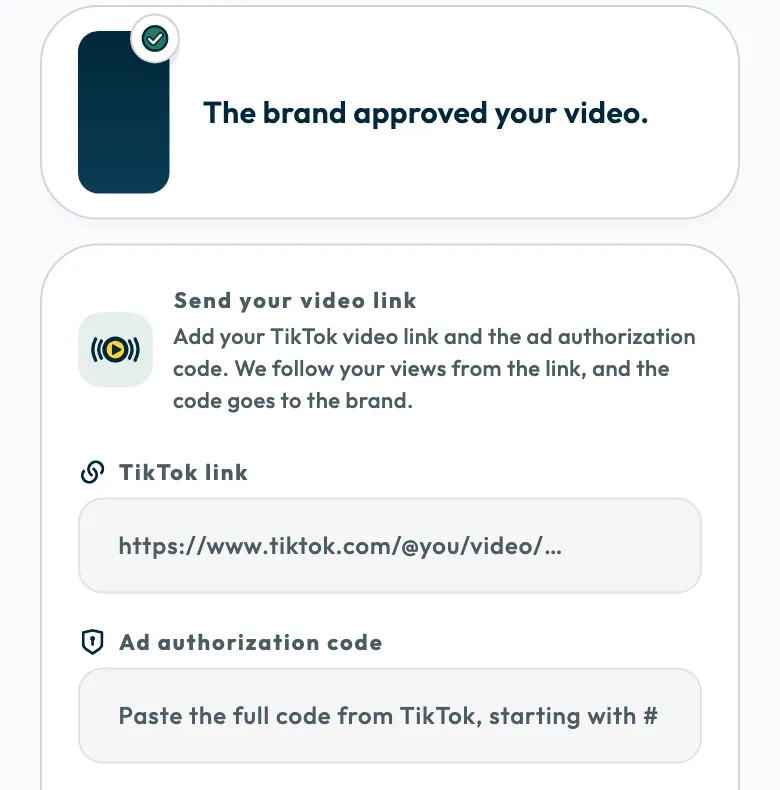
If the campaign asks you to post on your account, post the video on TikTok once it is approved and on its posting date, then send its link and ad code (Spark Ads) from the video page. In the app, the code is called “Ad authorization code”.
Shortcut follows the video's views from the link, and the code goes to the brand. Once you have posted every video the campaign asks of you, your fee is added to your wallet.
Why are the link and ad code needed?
- The link: it proves the video is posted, and its views are followed from it. You see them on the video page under “Views so far” and in your performance stats.
- The ad code: it lets the brand run your video as an ad from your account in TikTok's ad platform, as Spark Ads.
When to post
- If the app says “Don't post yet” or “Post it on ...”, do not post before that day. The app and a WhatsApp message tell you on the day.
- If it says “Post the video and send the link by the end of ...”, do both before that day ends.
- If the app says the posting date will be set soon, do not post until it tells you.
Mentions and hashtags
Use the mention and hashtags listed on the campaign page under “Mention” and “Hashtags”, and follow the “Do” and “Don't” guidelines.
How do I create the ad code in TikTok?
The ad code (Spark Ads) is an authorization code you create in the TikTok app for the posted video. Open the video in TikTok, open its ad settings from the video's options, turn on ad authorization, then create the code and copy it. The code starts with #, so copy all of it.
Send the link and code
- Post the approved video on the TikTok account linked to your Shortcut profile.
- Copy the video link from TikTok, then create the ad code and copy it.
- Open “Work” in Shortcut, then “In progress”, and tap the video.
Paste the link into “TikTok link”.
- Paste the whole code into “Ad authorization code”.
- Tap “Submit”.
The message “We've got your post link” appears, then the “Your video is posted” card shows your views and an “Open it on TikTok” button.
The link must point to a single TikTok post, from tiktok.com or as a short link from vm.tiktok.com or vt.tiktok.com.
If you are late
The app tells you that you are late. Post the video now, then send the link and code.
Common questions
Is the “Ad authorization code” the same as the Spark Ads code?
Yes. “Ad authorization code” is the app's name for the ad code.
Can I post from an account other than the one linked to my profile?
Post from the account linked to your profile.
Did this article answer your question?
Thank you. We use your answer to improve the article.
Your answer could not be saved. Try again.
Need more help?
Contact our support team, and we will help you with your question.