Your script arrives after you accept the invitation, on the video page in “Work”. A WhatsApp message tells you when it arrives.
The script and the campaign guidelines show what the brand expects from the video. Read both in full before you film.
Why read the whole script before filming?
Following the script and guidelines cuts down on revisions and re-shoots. Delivering on time and getting approved on the first take together make up 80% of your “Overall rating”. See how your rating is calculated.
Open the script
- Open “Work”, then “In progress”.
- Tap the campaign, then the video.
Read the “Read your script” card.
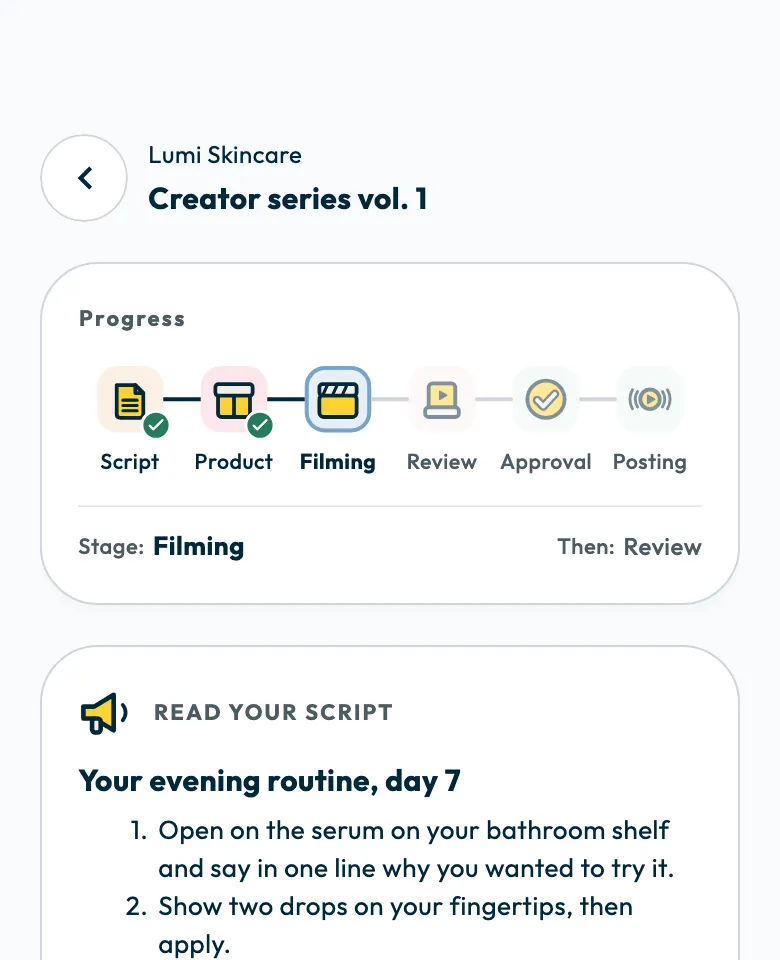
The script shows the scenes “Scene by scene”. It may also show how to film: length, video size, language, tone, what to highlight, “Videos to learn from” and notes from the brand.
If the script is “on its way”
It has not been sent yet, so wait for it before filming. If the campaign uses a discount code, the script does not come before the code.
The video stages
The top of the video page lists the stages in order, with the current stage and the next one:
- Script
- Product, or Visit, depending on the video type
- Filming
- Review
- Approval
- Posting
At the Product stage, you confirm the product arrived, as described in confirming you received the product. At the Visit stage, you record your attendance, as described in confirming a branch visit.
Campaign guidelines and due date
The campaign page shows the campaign brief, the “Do” and “Don't” guidelines, the platforms, the mention and hashtags to use, and the “Video due” date. To read the whole brief, tap “Read the full brief”.
A video counts as on time when its first version is uploaded before the end of its due day, Saudi time. See uploading your campaign video.
If you cannot deliver on time
The app has no way to request an extension. Contact the support team about the date and give the campaign name. Once you are past the due date, the video page shows how many days late you are.
Did this article answer your question?
Thank you. We use your answer to improve the article.
Your answer could not be saved. Try again.
Need more help?
Contact our support team, and we will help you with your question.