Your bank details are saved under “Bank details”. The IBAN is needed before you accept your first invitation, and all three details before you request a payout.
Enter your bank details in the app only, and never send them in a chat.
Why does Shortcut ask for the IBAN before I accept an invitation?
Your IBAN goes into the campaign agreement prepared when you accept an invitation, and it is where your fee is paid. So the app asks you to add it before you finish accepting your first invitation.
The bank name and the account holder's name are needed when you request a payout. If either is missing, “Wallet” shows a prompt such as “Add the bank name before you request a payout”.
What details are needed?
- Your bank's name.
- The account holder name as it appears at the bank.
- Your full IBAN. In Saudi Arabia it starts with SA and has 24 characters; the screen shows the length for your country.
- An IBAN document, which is optional: PDF, JPG or PNG, up to 5 MB.
Add or change your bank account
- Open “Account”, then “Profile”, then “Bank details”. You can also open it from “Wallet” by tapping “Link”, “Complete” or “Edit” next to the payout method.
Enter “Bank”, “Account name” and “IBAN”.
- Attach the “IBAN document” if you wish.
- Tap “Save”.
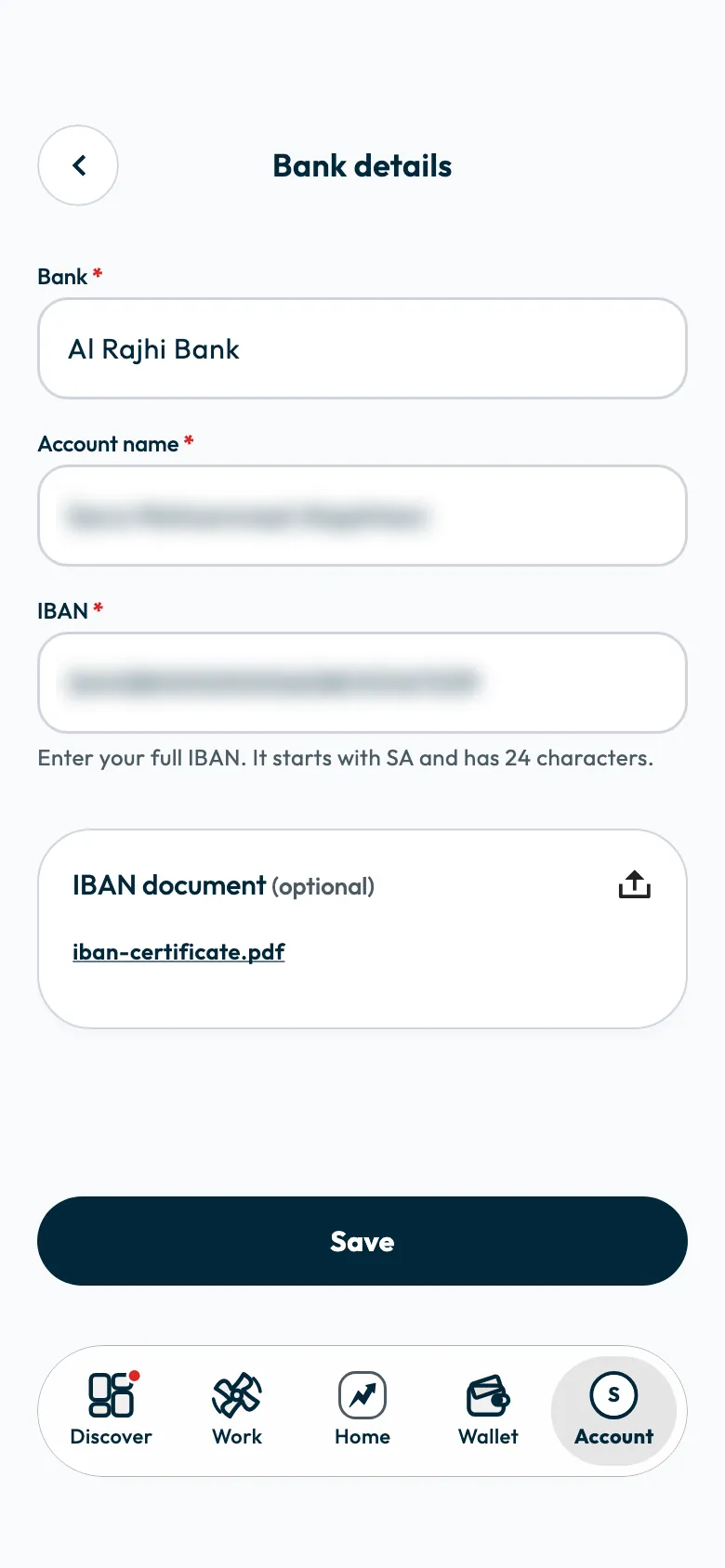
“Bank details updated successfully” appears. The app masks part of your IBAN in “Wallet” to protect your details.
What happens to earlier payout requests
A payout you requested before the change is paid to the account saved when you requested it. New requests go to the new account.
So if you want a particular fee paid to the new account, update your details before you request that payout.
Common questions
Can I send my IBAN to support so they add it for me?
Do not send it in any chat. Enter it yourself under “Bank details”; that is where the bank account is taken from when you request a payout.
Do I have to attach the IBAN document?
No. The document is optional; the bank, account holder name and IBAN are enough to request a payout.
Next step
Once your details are saved, request your fee as described in How do I withdraw my Shortcut earnings to my bank account?. If you are VAT-registered, see When do I need to attach a tax invoice to a payout?.
Did this article answer your question?
Thank you. We use your answer to improve the article.
Your answer could not be saved. Try again.
Need more help?
Contact our support team, and we will help you with your question.