The verification code is sent by SMS to the number you entered. It has 6 digits and stays valid for 5 minutes.
The code protects your account and your earnings: no one can sign in with your number without the code reaching your phone. So never share it with anyone.
Try these, in order
Check the number shown on the “Verification code” screen after “We sent the code by text message to”. If it is wrong, tap “Change number” and enter the right one.
- Check your text messages, including any spam or junk folder your phone has.
- Make sure your phone has signal and can receive SMS.
- Wait for the “Resend code in” timer, which is 45 seconds, to finish, then tap “Resend code”.
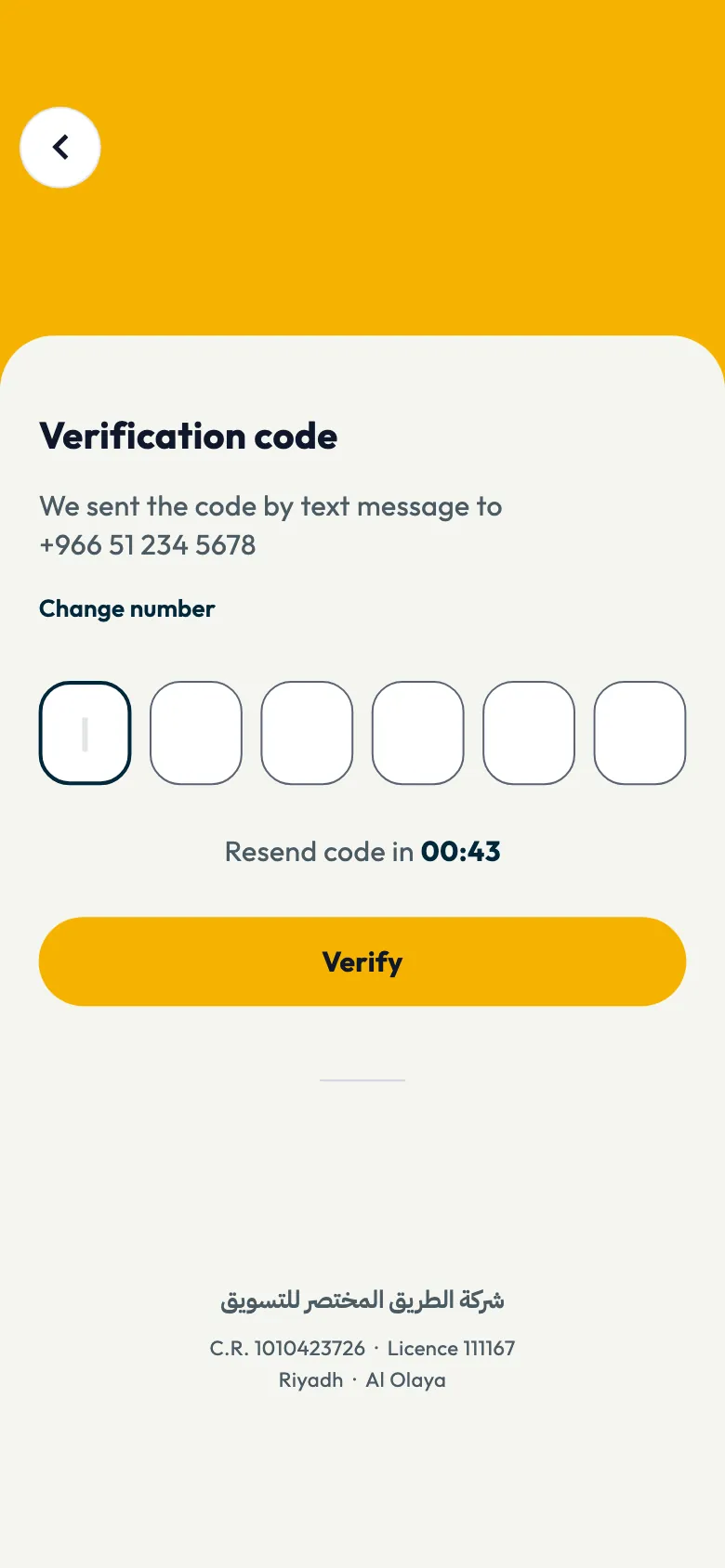
If the code has expired, request a new one the same way.
If the app says the code is incomplete
Enter all six digits, then tap “Verify”.
If the app says “One moment”
A code was requested several times in a short time, so requests are paused briefly to protect your number. Wait a minute, then try again.
If the app says the account has been removed
The message “This account has been removed. Please contact support.” appears with a “Contact us” button. Tap it to message the support team on WhatsApp so they can check the number.
If you deleted your account yourself earlier, you can sign up again with the same number. See How do I delete my Shortcut account?.
If it still doesn't arrive
Contact support. See How do I contact Shortcut support?.
Did this article answer your question?
Thank you. We use your answer to improve the article.
Your answer could not be saved. Try again.
Need more help?
Contact our support team, and we will help you with your question.